

Turn every clinical search into CME credit.
PEPID CME automatically marks the topics you look up at the bedside, so every shift counts toward your AMA PRA Category 1 credits™. Accredited by ACEP and AAEM. Unlimited earning. Three clicks to claim.
REQUIRES ACTIVE SUBSCRIPTION TO THE EMERGENCY MEDICINE AND/OR PEDIATRIC EMERGENCY MEDICINE SUITE.
Watch The Overview Video
What is PEPID CME (1min)
Prefer to read? See the 3-step workflow below →

Add CME to Your Emergency Medicine or Pediatric Emergency Medicine Suite:
Continuing Medical Education, 1-Year
Any Device or Online (Connect) with Emergency Medicine or Pediatric Emergency Medicine Suite
$169/year – billed every year
Continuing Medical Education, 2-Year
Any Device or Online (Connect) with Emergency Medicine or Pediatric Emergency Medicine Suite
$338 billed every 2 years
Continuing Medical Education, 3-Year
Any Device or Online (Connect) with Emergency Medicine or Pediatric Emergency Medicine Suite
$507 billed every 3 years
PEPID CME FAQ
Read the answers to commonly asked CME questions below. ACEP & AAEM specific CME questions follow this general PEPID CME FAQ.
Log In | Register Your CME
Start earning your CME by logging into your CME account here.
1. Sign in with your PEPID ID and Password.
2. Choose ACEP or AAEM as your Accrediting body.
3. Start using your PEPID subscription
What are the PEPID CME requirements
- You must have a subscription to PEPID Emergency Medicine or Pediatric Emergency Medicine.
- You must have an ACEP CME account OR AAEM membership.
- You must be using one of the following devices:
• iPhone version 4.1.4 or later
• iPad version 1.5.0 or later (This version is no longer receiving UI updates but content is still being updated.)
• Android version 28.3.1 or later
• PEPID Connect
Do I need a subscription to PEPID Emergency Medicine or Pediatric Emergency Medicine to use PEPID CME?
Yes. PEPID CME is a companion product inside PEPID’s Emergency Medicine or Pediatric Emergency Medicine Suites only. Using these products, you actually earn continuing education credits at the point of care. Simply use one of these suites as a clinical support tool and earn CME credits during your everyday workflow.
How do I enable CME on iPhone?
iPhone App: PEPID CME on the iPhone is only available through PEPID® for iPhone version 4.1.4 or later. Click here to be directed to the PEPID® iPhone app in the app store. To access CME from within the PEPID® iPhone app, simply tap on the “CME” tile on your suite’s main home screen.
To automatically enable CME usage tracking on the PEPID® iPhone app, choose “YES” when prompted after your suite is finished downloading.
To disable or enable CME usage tracking at any time, tap on the PEPID button in the top right corner of your suite’s main home screen. You will be asked to exit the product. Choose “Yes,” and you will be taken to the “My PEPID” screen. Choose the “Settings” tile, and select “CME Usage Settings.” Here, you can toggle usage tracking.
How do I enable CME on iPad?
PEPID CME on the iPad is only available through PEPID for iPad version 1.5.0 or later. Click here to be directed to PEPID for iPad on the App Store. To access CME on the PEPID iPad app, tap on the “+” in the top right corner of your screen, and choose “EARN CME” from the list.
To automatically enable CME usage tracking on the PEPID iPad app, choose “YES” when prompted after your suite is finished downloading.
To disable or enable CME usage tracking at any time, tap on the PEPID logo in the top left corner of your suite’s main screen. From the welcome screen, tap on “Settings,” where you will be able to toggle CME usage tracking.
How do I enable CME on Android?
To access CME on the PEPID Android app, simply tap on the CME button in the table of contents on your home screen. Choose “Earn CME” from the list.
To automatically enable CME usage tracking on the PEPID Android app, choose “YES” when prompted after your suite is finished downloading.
To disable or enable CME usage tracking at any time, tap on the PEPID icon (located in the top right corner of your screen) until you are in the “My PEPID” screen. Scroll to the bottom of your suites and choose “Settings.” Here, you can toggle usage tracking.
Can hospitals with institutional PEPID access have their emergency doctors earn CME credits?
Yes, please contact Sales for more details:
sales@pepid.com
1-888-321-7828 x251
ACEP CME FAQ
How is PEPID certified to offer ACEP CME credits to emergency physicians?
As of May 2015, PEPID is certified by the American College of Emergency Physicians (ACEP), which currently allows us to offer CME credit only to users of our Emergency Medicine Suite or Pediatric Emergency Medicine Suite.
This activity has been planned and implemented in accordance with the accreditation requirements and policies of the Accreditation Council for Continuing Medical Education (ACCME) through the joint providership of the American College of Emergency Physicians and PEPID. The American College of Emergency Physicians is accredited by the ACCME to provide continuing medical education for physicians.
Do I have to be a member of ACEP to earn ACEP CME credits?
No, you do not have to be a member; you can sign up for an ACEP eCME account for free to earn and track your PEPID ACEP CME credits.
How do I subscribe to PEPID ACEP CME?
To use PEPID’s ACEP Continuing Medical Education add-on, you must be subscribed to ACEP CME through PEPID and have a subscription to PEPID Emergency Medicine or Pediatric Emergency Medicine. You also need to have or obtain a complimentary account with ACEP eCME. ACEP membership is not required.
To subscribe to PEPID ACEP CME, please subscribe above.
How do I link my ACEP ID to my PEPID ACEP CME account?
You will be prompted to connect your ACEP account after the initial login to PEPID ACEP CME. Just follow the steps on screen. You cannot access the CME site until this step has been completed.
How do earn ACEP CME credits?
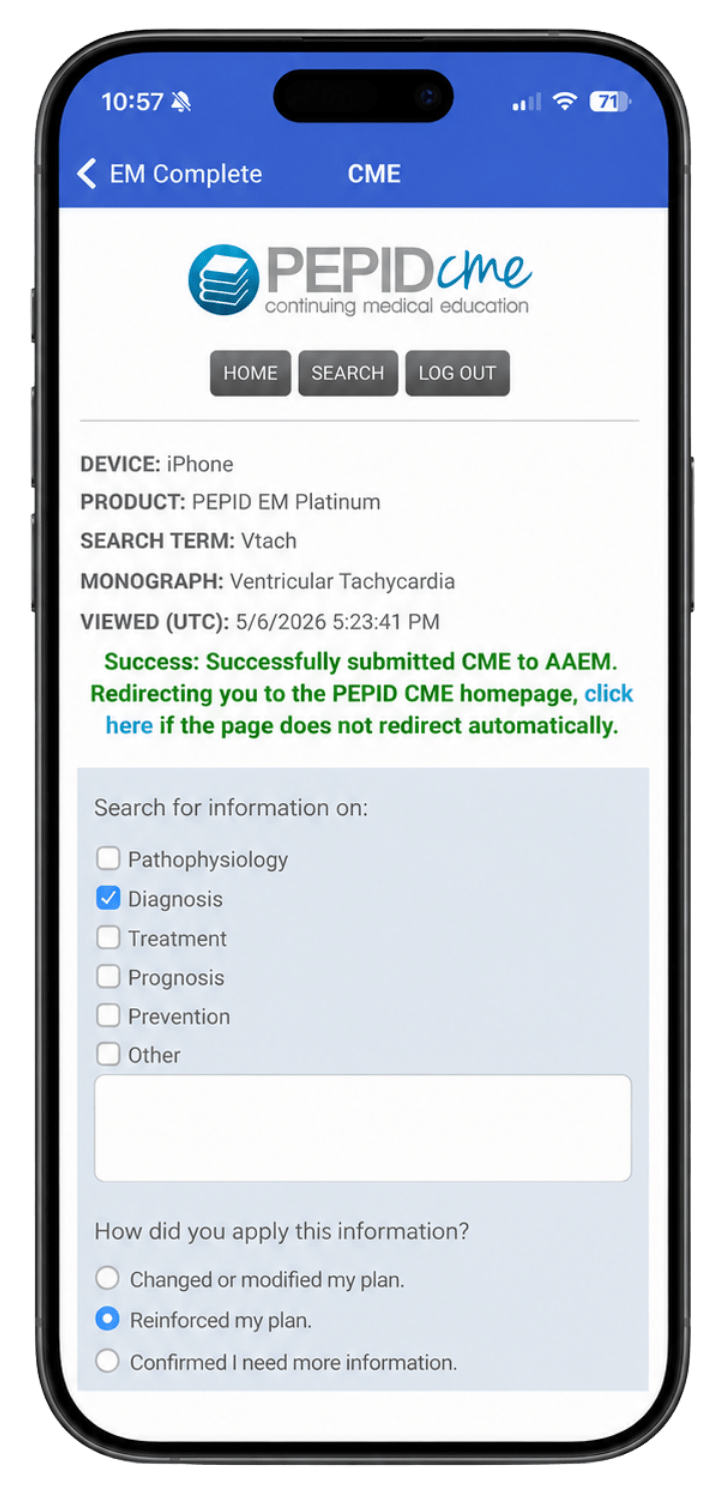
Earning ACEP CME credits is really simple with PEPID. As you search for topics, you can earn credit by clicking the CME tab directly from within PEPID Emergency Medicine Suite. From there, just answer the following three questions:
1. What did you search for?
2. How did you apply it?
3. Did the information meet your objectives?
Once you’re done, click “Earn Credit,” and your credits are directly uploaded to ACEP eCME. Each topic submitted is eligible for 0.5 AMA PRA Category 1 credit(s)™.
How do I claim and print my ACEP CME credits?
Managing ACEP CME credits can be done by logging into your ACEP eCME account.
Claiming Credits: From the “Claim CME” tab, select the topic, enter the number of hours claimed, and click “Add to Transcript.”
Printing Credits: From the “CME Transcript” tab, click the print icon next to the topic to print your certificate.
Can Canadian doctors earn ACEP CME credits using PEPID?
Our CME accreditation is for the U.S. standards, not Canadian or international. It would apply to any emergency physician in the United States. You are not required to be a member of ACEP to earn CME credits with PEPID ACEP CME.
AAEM CME FAQ
How is PEPID certified to offer AAEM CME credits to Emergency physicians?
As of May 2016, PEPID is certified by the American Academy of Emergency Medicine (AAEM), which currently allows us to offer AAEM CME credit only to users of our Emergency Medicine Suite or Pediatric Emergency Medicine Suite.
Do I have to be a member of AAEM to earn AAEM CME credits?
In order to earn AAEM CME credits you must be a current member of AAEM.
How do I subscribe to PEPID AAEM CME?
To use PEPID’s AAEM Continuing Medical Education add-on, you must be subscribed to AAEM CME through PEPID and have a subscription to PEPID Emergency Medicine or Pediatric Emergency Medicine. You also need to be a current member of AAEM in order to earn AAEM CME credits.
To subscribe to PEPID AAEM CME, please subscribe above.
How do earn AAEM CME credits?
From the list of recently viewed topics, select a topic by clicking “Earn Credit” in the right column.
From there, just answer the following questions:
1. What did you search for?
2. How did you apply it?
3. Did the information meet your objectives?
4. Describe how the information met your objectives.
How do I print my AAEM CME credits?
In the upper right, click on “Print Certificates” then select the ones that you wish to submit for credit, or choose to print all certificates.
Can Canadian doctors earn AAEM CME credits using PEPID?
Our CME accreditation is for the U.S. standards, not Canadian or international. It would apply to any emergency physician in the United States. You are required to be a current member of AAEM in order to earn AAEM CME credits with PEPID AAEM CME.